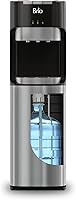
How to Use a Primo Water Dispenser
To use a Primo water dispenser, set it on a level surface, load the water bottle as its model requires, and follow its manual before turning on heating or cooling. Then choose the right spout or button for hot, cold, or room-temperature water.
On this page (7 sections)
- How do you set up a Primo water dispenser?
- How do you dispense water from a Primo dispenser?
- How do you know when to replace the bottle?
- Can you use any water in a Primo dispenser?
- How do you clean and maintain a Primo water dispenser?
- What should you do if a Primo dispenser won't dispense?
- What is the simple daily routine for using a Primo dispenser?
To use a Primo water dispenser, set it on a level surface, load the water bottle as your model requires, and follow its manual before turning on heating or cooling. Then choose the right spout or button for hot, cold, or room-temperature water.
Primo models can differ in how they load bottles, dispense water, and control hot water. Find the model number and keep its manual nearby before setup; use the controls and cleaning directions for that exact unit.
How do you set up a Primo water dispenser?
Set up your Primo dispenser by placing it securely, loading the bottle according to its design, and following the manual's first-use steps. The order matters because some models need water in their reservoirs before heating or cooling begins.
Clear enough space around the unit for access to the bottle compartment and controls. Keep it on a stable, level surface near an outlet if the model uses a power cord, and keep the plug and cord away from wet areas.
Read the manual before connecting power or switching on hot and cold functions. Check whether it gives a specific fill, flush, or wait procedure for first use.
How to use a Primo water dispenser after loading a bottle
After loading, confirm the bottle is seated and water is reaching the dispenser's reservoirs before using temperature controls. Follow your model's instructions for checking this, since loading steps vary.
For a top-load unit, lift and place the bottle only as directed, keeping the cap or seal in the position the manual specifies. For a bottom-load unit, connect the intake assembly as instructed and slide the bottle into the cabinet without pinching the tubing.
A bottom-load cooler can make bottle changes easier for people who prefer not to lift a full jug onto the top. For example, the Avalon A4BLWTRCLR has a bottom-loading cabinet and supports 3- to 5-gallon bottles.
If the dispenser makes unusual sounds, leaks, or doesn't draw water after a bottle change, stop and consult the manual before trying again. Don't force connectors or controls.
How do you dispense water from a Primo dispenser?
Use the control marked for the temperature you want, and place your cup under the matching spout before dispensing. Controls vary by model, so identify each button, lever, or paddle from the labels and manual.
For cold or room-temperature water, press or hold the matching control as directed. Release it when your cup is full, and use the drip tray to catch small drips.
If you are choosing a model and want to compare loading styles and controls, see our guide to the best Primo water dispenser. The name "water dispenser" can also cover different designs, as explained in what is a water dispenser called.
How do you use the hot-water control safely?
Keep hot water away from children and use the safety lock exactly as the manual describes. Some dispensers require a two-step action, such as releasing a lock before pressing the hot-water control.
Place a heat-safe cup under the hot spout before dispensing, and keep your fingers clear of the outlet. Don't leave a cup unattended while filling, and check the water temperature before drinking or preparing a child's drink.
The Brio 520 Series has hot, cold, and room-temperature settings and a two-step hot-water control that automatically relocks after dispensing. Its bottom-load design also keeps the bottle in a lower cabinet.
A different bottom-load option, the Brio CLBL420V2, has three temperature settings, a two-step hot-water lock, and an alert for bottle replacement.
Keep the drip tray clean and empty it before it overflows. Don't use the hot setting if the dispenser's manual says it is not ready or if the unit shows a fault.
How do you know when to replace the bottle?
Replace the bottle when it is empty or the dispenser signals that it needs changing. Some models have an empty-bottle indicator, while others may simply stop dispensing as the water runs out.
Switch off hot and cold functions if the manual directs, then follow its bottle-change steps. For a bottom-load model, remove the bottle and intake assembly as instructed, fit the new bottle, and make sure the tubing is not bent.
After replacement, allow the reservoir to refill as directed before dispensing. If the indicator stays on or water doesn't flow, check that the bottle and intake assembly are seated properly.
Can you use any water in a Primo dispenser?
Use only water that your specific dispenser is designed to accept. Bottle compatibility and any filtration instructions depend on the model, so check the manual before filling a bottle yourself or connecting another water source.
Our guide explains whether Primo water dispensers can use any water. If your model has a filter, find its type and replacement instructions in the Primo water dispenser filter guide.
Don't assume every Primo dispenser has a filter or that a filter is required. If you're unsure, look up the exact model number and follow its care and water-use directions.
How do you clean and maintain a Primo water dispenser?
Clean the dispenser on the schedule and by the method in its manual. Wipe spills promptly, keep the drip tray clean, and follow the maker's steps for any reservoir or spout cleaning.
Unplug the unit before cleaning if the manual instructs you to do so. Avoid soaking electrical parts, and don't mix cleaning products or use a cleaner the manual doesn't allow.
Some Brio models include a UV self-cleaning feature, but that does not mean every dispenser has one or that routine care is unnecessary. See our instructions for how to clean a Primo water dispenser.
The surfaces and internal parts of a dispenser vary by model. For a general overview, read what a water dispenser is made of and what that means.
What should you do if a Primo dispenser won't dispense?
Check the bottle, intake connection, power, and controls before assuming the dispenser is broken. Use the manual's troubleshooting steps for the exact model.
If a bottom-load dispenser stops drawing water after a bottle change, confirm the intake tube is connected and not kinked. If a top-load unit is involved, check that the bottle is seated as instructed.
If the unit is corded, confirm the plug is secure and that the outlet works, while keeping the area dry. Don't open the cabinet or attempt electrical repairs unless the manual specifically directs you to.
Stop using the unit if you see a leak near electrical parts, smell something burning, or notice damaged wiring. Contact Primo or the seller's support channel using the information for your model.
What is the simple daily routine for using a Primo dispenser?
Choose the temperature, use the matching control, and check the bottle and drip tray as part of normal use. Keep the manual's safety and cleaning instructions close, especially for first setup and bottle changes.
Pick a bottom-load model if lifting a full bottle is a concern, and choose a model with a hot-water lock if that control suits your household. Whatever the design, follow the model-specific steps for loading, dispensing, and cleaning.
Frequently asked questions
How do you set up a Primo water dispenser?
Place the dispenser on a level surface with room for airflow, then load the bottle according to its model's manual. Follow the manual's instructions for first use and for when to connect power or switch on heating and cooling.
Wait for the reservoirs to fill before using hot or cold settings.
How do you dispense hot water from a Primo dispenser?
Use the hot-water control identified in your model's manual, and keep hands and cups clear of the spout while dispensing. If the model has a child safety lock, release it as instructed and relock it after use.
Hot water can scald, so supervise children near the dispenser.
Can you use a Primo dispenser without electricity?
It depends on the model and which temperature you need. A corded electric dispenser needs power for its heating and cooling functions, and some models may also need power for dispensing controls.
Check the manual for your specific model before relying on it during an outage.
How often should you clean a Primo water dispenser?
Follow the cleaning schedule and method in your model's manual, and clean sooner if you see residue or a spill. Unplug the dispenser before cleaning when the manual directs, and avoid getting water into electrical parts.
A self-cleaning feature does not automatically replace routine care.