How to Replace Waterdrop G3P800 Filters
Turn the used G3P800 cartridge counterclockwise to remove it, insert the matching replacement, and turn it clockwise until it is in place. Then follow the system's instructions to reset its filter indicator, since the reset steps can depend on which cartridge you changed.
On this page (6 sections)
- How do you replace a Waterdrop G3P800 filter?
- How can you tell which G3P800 filter needs replacing?
- How do you reset the Waterdrop G3P800 filter indicator?
- What should you do after installing a G3P800 cartridge?
- Which other products may suit a home water setup?
- What should you remember about Waterdrop G3P800 filter replacement?
To replace a Waterdrop G3P800 filter, turn the used cartridge counterclockwise, remove it, insert the matching replacement, and turn it clockwise into place. Check the G3P800 manual for the correct filter and indicator reset steps, since each cartridge can have its own service interval and reset procedure.
Choose a cartridge made for your G3P800 and the filter position you're changing. A similar-looking filter for another Waterdrop system may not be compatible.
How do you replace a Waterdrop G3P800 filter?
Remove the old cartridge with a counterclockwise turn, then install the correct new one with a clockwise turn. Follow the model's manual for filter locations, any water shutoff steps, and what to do after installation.
- Confirm which filter indicator or cartridge needs attention.
- Check the G3P800 manual for the corresponding filter and replacement instructions.
- Remove the used cartridge by turning it counterclockwise.
- Align the matching replacement with its slot and turn it clockwise until seated.
- Follow the manual's steps for flushing the system, if required.
- Reset the indicator for the filter you changed.
Don't force a cartridge that resists turning. Check its alignment and model match, then consult the manual before trying again.
Which Waterdrop G3P800 replacement filter should you buy?
Match the replacement to the G3P800 model and the filter stage shown by the system. Check the filter name and compatibility before ordering, and don't rely on appearance alone.
The G3P800 is a tankless reverse osmosis system. Waterdrop also makes other tankless models, including the G3P600, so confirm that a replacement specifically supports your G3P800.
For a different model, the Waterdrop G3P600 Tankless Reverse Osmosis Water Filter is a separate system with twist-in filters. Its replacement instructions describe turning a used cartridge counterclockwise and the new one clockwise, but that doesn't confirm G3P600 cartridges fit a G3P800.
If you are comparing system types, see our best tankless reverse osmosis system guide. For more models from the same brand, compare best Waterdrop tankless reverse osmosis systems and best Waterdrop reverse osmosis systems.
How can you tell which G3P800 filter needs replacing?
Use the G3P800's filter indicator and manual to identify the cartridge that needs attention. The display helps point you to a filter, while the manual helps you match that indicator to the right replacement.
If the indicator isn't clear, look for the filter name or position in the system instructions. Don't reset all filter-life tracking just because one cartridge was changed.
A replacement schedule depends on the model's instructions and your use. Follow Waterdrop's guidance for the G3P800 rather than applying an interval from a different system.
How do you reset the Waterdrop G3P800 filter indicator?
Reset the indicator for the specific cartridge you replaced, using the G3P800 manual's procedure. The reset tells the system that the new filter is in service; it does not replace the physical cartridge change.
Before resetting, verify the new filter is fully seated and any required flushing steps are complete. If the display still shows the old status, check that you used the right reset sequence for that filter.
Don't use instructions for a Brita pitcher indicator as a substitute. A Brita water filter battery replacement addresses a different kind of indicator and won't explain the G3P800's filter reset.
What should you do after installing a G3P800 cartridge?
Follow the G3P800 manual's post-installation instructions before drinking from the system. Check for leaks and confirm the cartridge is seated, then flush or run the system as directed.
If a connection leaks or the cartridge won't lock into place, stop and check the fit and alignment. Don't keep twisting harder; contact Waterdrop support if the manual doesn't resolve the issue.
A filter change is also a useful time to review how your household uses filtered water. Our drinking water filter guide explains how to compare filter types, while faucet water filter vs pitcher covers simpler alternatives.
If you use a pitcher for some water needs, read our Aquagear water filter pitcher reviews for another filter format. For G3P800 owners curious about another feature, see whether the Waterdrop G3P800 dispenses hot water.
Which other products may suit a home water setup?
Choose a product based on the filtration setup or household need you want to address. These options serve different purposes, so neither is a replacement cartridge for the G3P800.
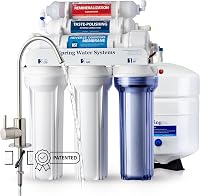
The iSpring RCC7AK-BN is an under-sink reverse osmosis system with a six-stage filtration setup and a mineral stage. Its transparent first-stage housing lets you view buildup as a cue to check the filter.
The Amazon Essentials tank top is unrelated to water filtration, so it won't help replace or maintain a G3P800 filter.
What should you remember about Waterdrop G3P800 filter replacement?
Use the G3P800 manual to match the cartridge, install it with the specified twist, and reset only the indicator for the filter you changed. That keeps the physical replacement and the displayed filter-life tracking aligned.
Choose a replacement identified for the G3P800, and contact Waterdrop if the model match or reset steps remain unclear. For another related question, read about Waterdrop G3P800 hot water.
Frequently asked questions
How do you replace a Waterdrop G3P800 filter?
Remove the used cartridge by turning it counterclockwise, then insert the matching replacement and turn it clockwise until it locks in place. Check the G3P800 manual for the exact cartridge position and any flushing or reset steps for that filter.
Do Waterdrop G3P800 filters all change the same way?
The cartridges may share a twist-in replacement method, but their positions, replacement intervals, and indicator steps can differ. Match the replacement to the G3P800 model and filter stage, then use the manual's directions for that cartridge.
How do you reset a Waterdrop G3P800 filter light?
Use the reset procedure in the G3P800 manual for the filter you replaced. The indicator may track separate cartridges, so reset only the relevant filter after installing it; resetting the wrong one can make the displayed filter life inaccurate.
Can you use G3P600 filters in a G3P800?
Don't assume G3P600 and G3P800 cartridges are interchangeable. Confirm the replacement's stated model compatibility before buying, and check the G3P800 manual or Waterdrop support if the cartridge name or fit is unclear.